A thoughtful workspace for Mac

Turn ideas into structured work.

Bring outlines, project documents and diagrams together in one calm place. Start with a thought, give it shape, and keep moving.

Native macOS app Your projects stay in folders you control
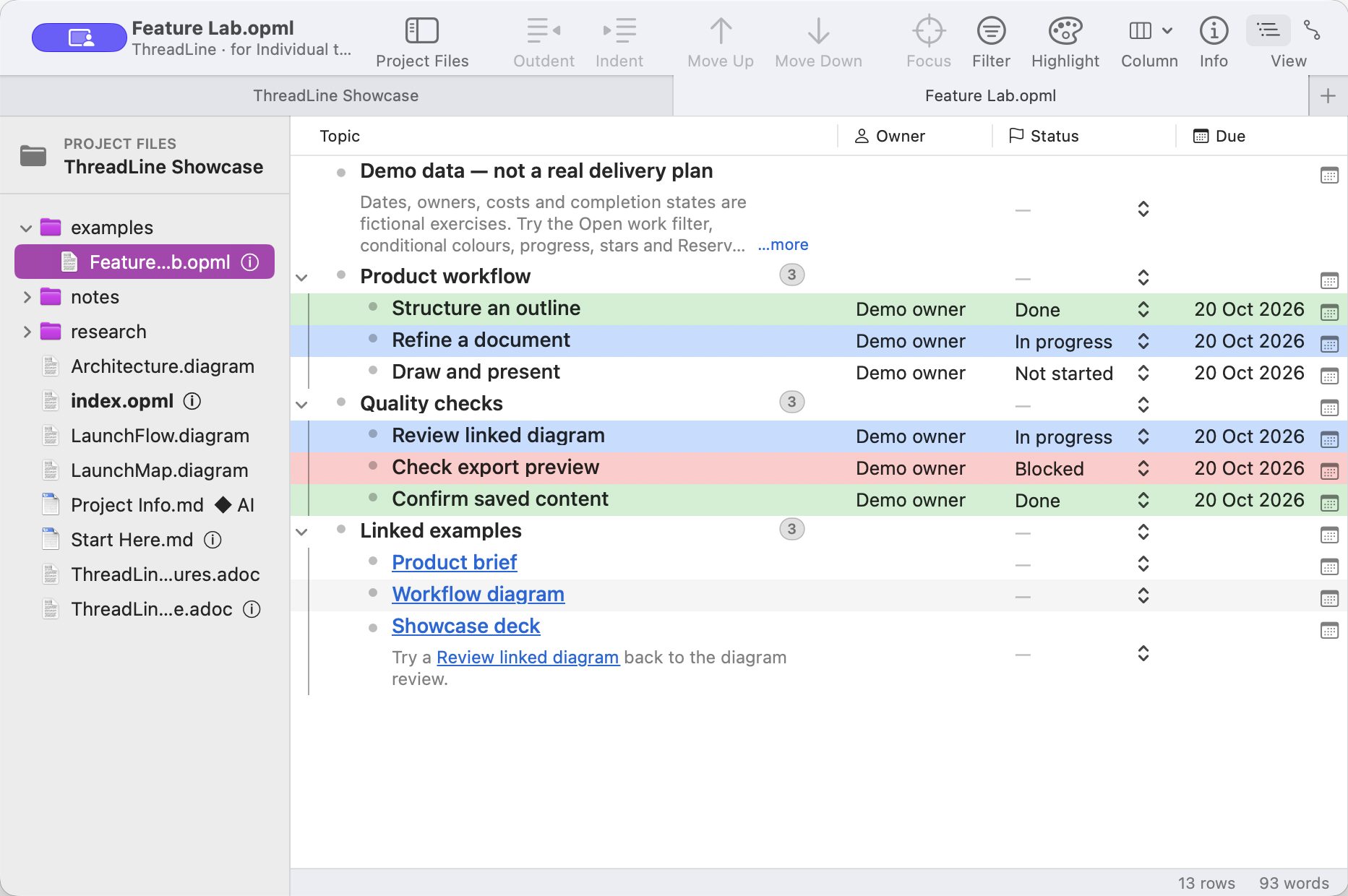
ThreadLine outline with nested project tasks, typed Owner, Status and Due columns, and the Project Files sidebar
Structure that stays flexibleMove a thought. Keep its context.
Feature Lab · fictional demonstration projectActual ThreadLine interface
A little more room to think: Structured outlines Connected documents Visual thinking Thoughtful publishing

One project, many ways to think

A place for the whole shape of an idea.

ThreadLine brings the pieces of a project closer, without asking you to flatten everything into one document.

01 · Find the structure

Start loose. Organise as you go.

Capture a thought, make it a row, and move it where it belongs. Your outline can stay lightweight or grow into a detailed plan with notes, columns and links.

  • Rearrange a hierarchy with the keyboard or by dragging.
  • Add typed columns, saved filters, calculations and colour rules.
  • Keep notes, row links and project-file links close to the work.
See what you can do with an outline
Nested outline rows with colorful status highlighting and linked example documents

02 · Keep the context

Let related work live side by side.

Each project is an ordinary folder for your outlines, Markdown and AsciiDoc documents, diagrams, and supporting files. Open them as tabs, link them together, and find them again in the shared file panel.

  • Work with local project files instead of a hosted workspace.
  • Switch between a formatted document and its editable source.
  • Keep cross-links useful as files move or get renamed.
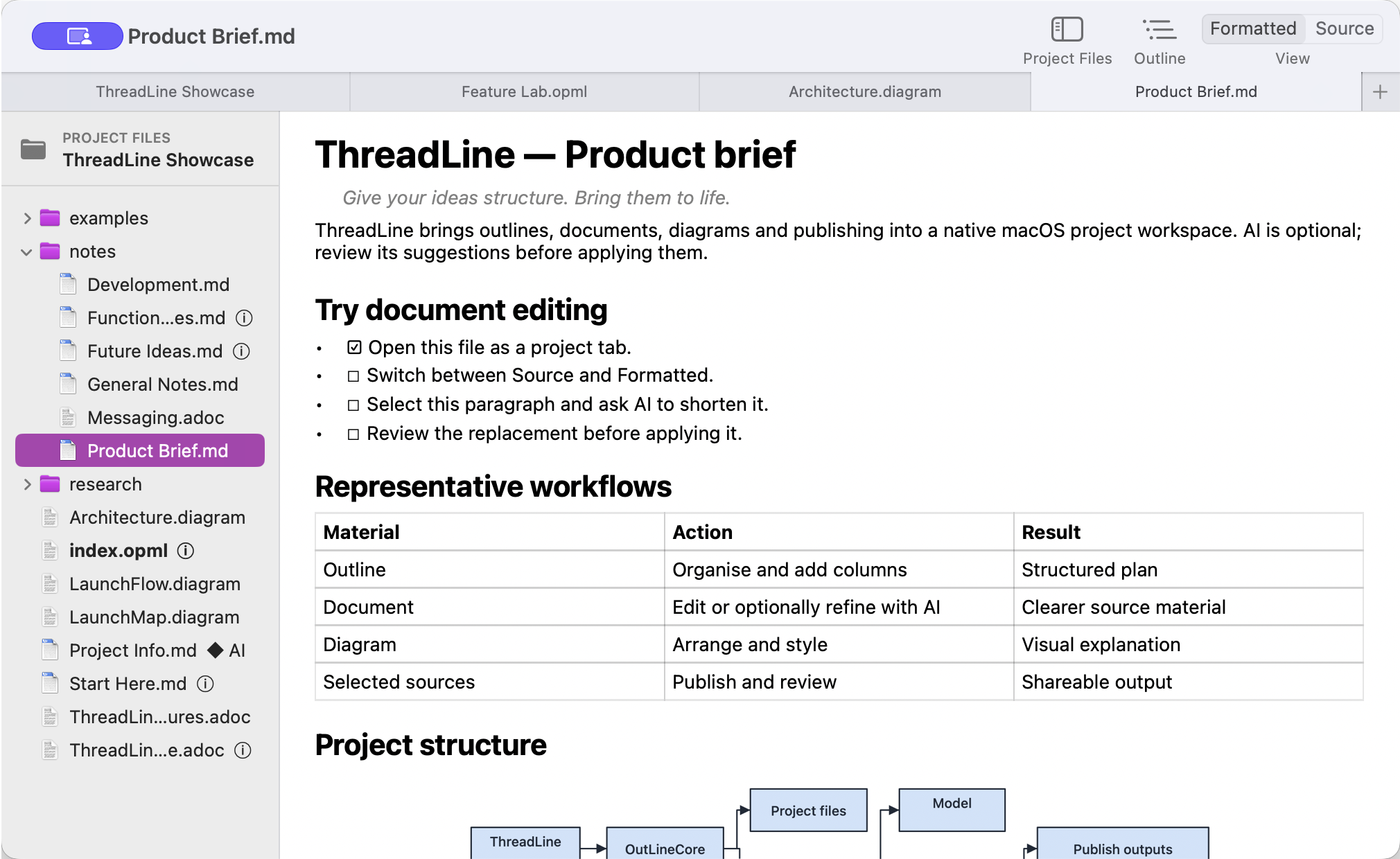
ThreadLine formatted Markdown project brief open beside an outline and other project tabs

03 · See the connections

Make a picture of how it works.

When a list is not enough, sketch a flow, map a process, or make a diagram from selected outline rows. Refine the shapes, connectors and layout in a dedicated canvas.

  • Draw, arrange and style shapes in a project diagram.
  • Use hand-drawn or clean visual styling.
  • Embed diagrams in documents and supported exports.
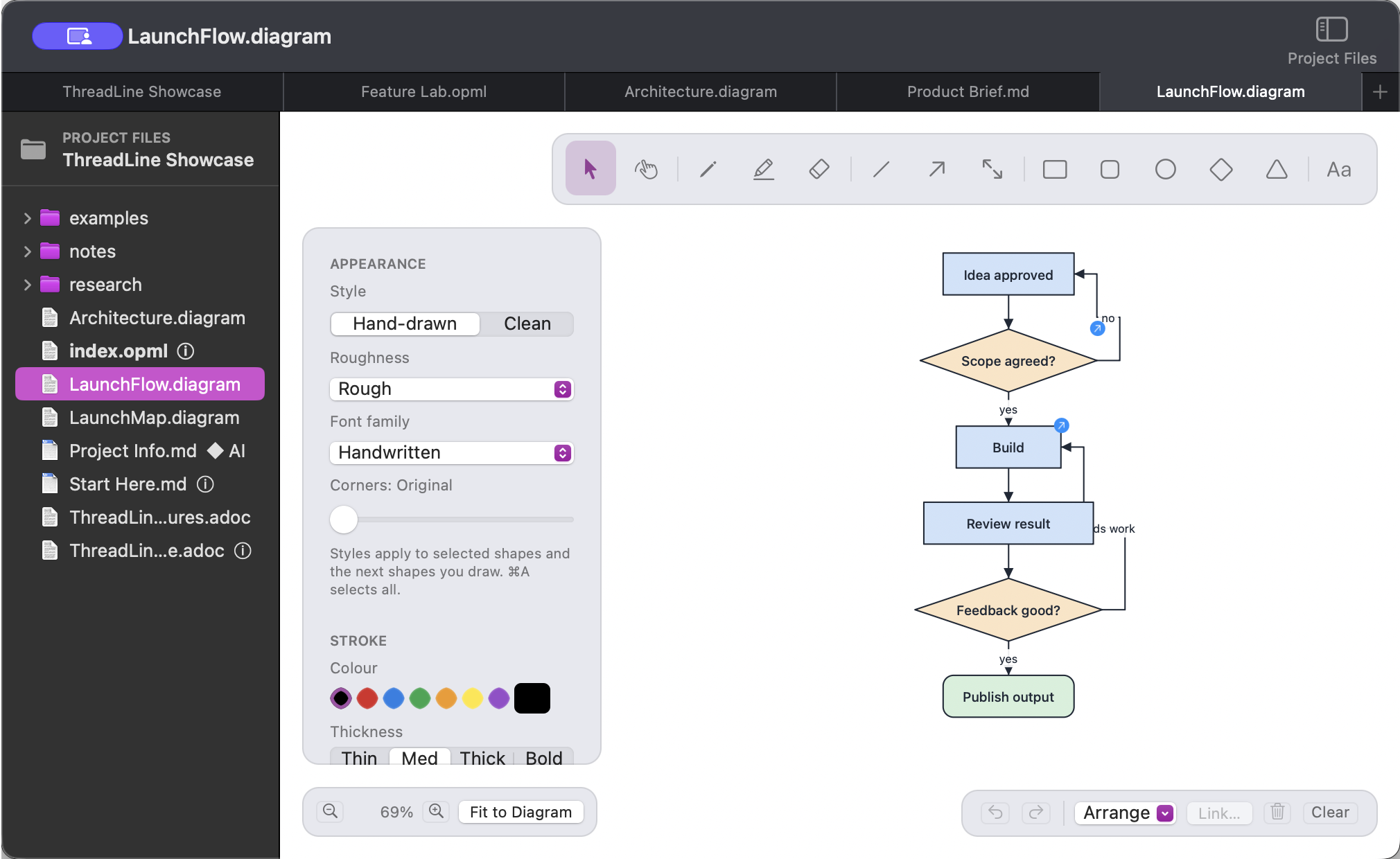
ThreadLine diagram editor with shape tools, appearance controls, and a product workflow diagram

Made for the work between thoughts

Useful details, quietly in reach.

Enough depth for serious projects, with the everyday actions close at hand.

More than a list

Nested rows, formatted notes, reusable templates, focus view, undo and flexible columns.

Find your next thread

Search project files, filter rows by what matters, and keep useful views ready to return to.

Bring existing work

Import spreadsheets, Word documents, PDFs, HTML, Markdown, AsciiDoc and OPML.

Publish with intent

Preview selected sources, then export a copy or shape reviewed material into a document, deck or set of pages.

Assistance, on your terms

AI is here when it helps. Out of the way when it doesn’t.

ThreadLine’s everyday outline and document workflows work without AI. When you choose to use it, decide which project sources become context and review suggestions before they change your work.

  • Choose OpenRouter, Ollama or a compatible custom provider.
  • Inspect prompts, select sources and mark files Never Send.
  • Edit generated drafts and review changes before applying.
A considered AI workflowYour review stays in the loop
01Choose the materialSelect the project files that should inform a requestYou choose
02Shape the requestReview the prompt and refine the directionYou guide
03Review the resultEdit a suggestion before it becomes part of your workYou decide

AI requests send the prompt and approved source material to the provider you select. A local Ollama model can keep processing on your Mac; Ollama cloud models are not local processing.

A useful next step

Take your thinking somewhere.

Bring in material from the tools you already use, then take selected project sources into a carefully reviewed export or publication.

CSVExcelWordPDFHTMLMarkdownAsciiDocOPML
A few practical details
OutlineCapture & arrange
DevelopConnect & refine
PublishPreview & share

Exports include OPML, Markdown, AsciiDoc, Excel, CSV, PDF and self-contained HTML. The imported source is never overwritten.

Make more of the work

From working draft to work worth sharing.

Publish a useful version, revisit an earlier one, or turn a written story into a presentation.

Versions

Return to an earlier draft.

ThreadLine keeps periodic project backups for changed outline and Markdown files. Browse and restore an earlier copy without overwriting the current file; supported documents also offer version history and revert commands.

Earlier copiesRestore safely

Present

Turn an AsciiDoc story into slides.

Use sections as slides and subsections as sub-slides. Add speaker notes, images and diagrams, choose themes and transitions, then save the presentation as a web page or PDF.

Speaker notesWeb page · PDF

Good to know

Designed for focused work.

A few details about how ThreadLine fits into your setup.

Is ThreadLine for individuals or teams?

It is designed first for individual thinking and project work, and can also fit small teams who share project folders. It does not include real-time multi-user collaboration or managed cloud project hosting.

Where are my projects stored?

Projects are ordinary folders on your Mac. You can open, copy, sync or version-control them with tools you choose. ThreadLine does not depend on a hosted project service.

Do I need to use AI?

No. Outlining, editing documents, drawing diagrams and publishing copies work without an AI provider. If you use AI, ThreadLine sends the relevant prompt and approved source material to the provider you select. Files marked Never Send are excluded.

What Mac does it need?

ThreadLine is a native Mac app and requires macOS 14 or later. It is not a browser or mobile editor.

Can it read scanned PDFs?

PDF import uses available text and page pictures; it does not perform OCR. Scanned pages remain pictures unless usable text is already present.

Give your ideas structure

Make room for your next good thought.

Explore the workflows that help an idea become a plan, a document, a diagram or something ready to share.

Explore ThreadLine’s features